Twitter+Notion+星球自动化
一个人,借助 OpenClaw,每天自动完成这些事:
- Twitter:自动搜热点 → 推送选题 → 生成推文+配图 → 定时发布 → 采集数据
- 知识星球:一键同步推文,带图片、带标签
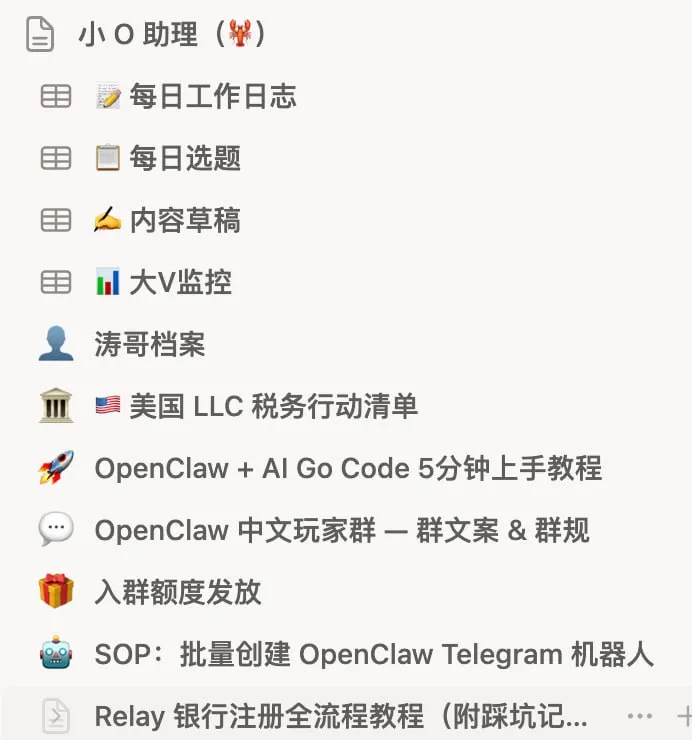
- Notion:所有内容自动归档,产品拆解案例库自动更新
- 公众号:Markdown 自动转微信排版,直接进草稿箱
- Twitter 回复:自动扫描@提及,分类整理,生成回复草稿,你说"1 2"就回复
这些事如果手动做,每天至少 3-4 小时。现在在 Telegram 里点几下,10 分钟搞定。
整体架构
每天 09:00
  OpenClaw 自动搜热点
  → 推送 3 个选题到 Telegram
  → 你选一个
  → AI 自动写推文 + 生成配图 + 发 Twitter + 同步星球 + 归档 Notion

每晚 21:30
  自动采集当天数据 + 生成日报

全天
  Twitter 回复扫描 → 建议草稿 → 你确认发送
你在整个流程里只做了一件事:选选题。
第一步:基础安装
# 如果没有 Node.js,先安装
curl -o- https://raw.githubusercontent.com/nvm-sh/nvm/v0.40.0/install.sh | bash
source ~/.bashrc && nvm install 24

# 安装 OpenClaw
npm install -g openclaw

# 初始化向导
openclaw onboard
安装完后,通过 Telegram Bot 跟 OpenClaw 对话——发消息 = 给 AI 下指令,AI 完成后自动回复结果。
第二步:配置 Twitter API
- 去 developer.x.com 注册开发者账号
- 创建 App,获取 4 个密钥:Consumer Key、Consumer Secret、Access Token、Access Token Secret
- 把这 4 个密钥发给 OpenClaw,让它存入配置文件
发推的技术链路:
你说"发一条关于 Cursor 的推文"
→ OpenClaw 写好内容
→ 调用 Twitter API v2(OAuth 1.0a)
→ 推文发布

带图片:
→ AI 生成信息图(Gemini API)
→ Twitter API v1.1 上传图片,获得 media_id
→ API v2 发推并带 media_id
Twitter API 按量付费,Free 套餐能发推但有限制,具体见 developer.x.com。
第三步:配置 Notion API
- 去 notion.so/my-integrations 创建 Integration
- 获取 API Token(
ntn_开头) - 在 Notion 里把目标页面/数据库"共享"给这个 Integration
配置好后,OpenClaw 就能:创建页面(自动归档)、读取数据库(读"待发布"推文)、更新状态(标记"已发布")。
第四步:设置定时任务
跟 OpenClaw 说:
帮我设置以下定时任务:
- 每天 09:00:用 bird 搜索 AI 热点,推送 3 个选题到 Telegram
- 每天 10:00:检查 Notion 有没有"待发布"推文,有就自动发
- 每天 11:00:扫描 Twitter @我的回复,整理建议回复草稿
- 每天 21:30:采集当天推文数据,生成日报推送到 Telegram
OpenClaw 会写入 cron 配置,不需要你写代码。
第五步:配图自动化
推荐用 Gemini API 生成信息图,配合宝玉信息图 Skill:
帮我配置 Gemini API 信息图生成,
API Key: 你的Key
风格:手绘风 + 个人水印
21 种布局 × 20 种风格 = 420 种组合,每次生成的图风格统一但不重复。Gemini API 有免费额度,日常使用基本不花钱。
第六步:知识星球自动同步
推文发完后,自动同步到知识星球
(AppID: 你的ID,AppKey: 你的Key)
同步时带上原始配图,自动打标签
配置好后,同一条内容 Twitter 和星球都有了,不用手动复制。
Twitter 回复管理
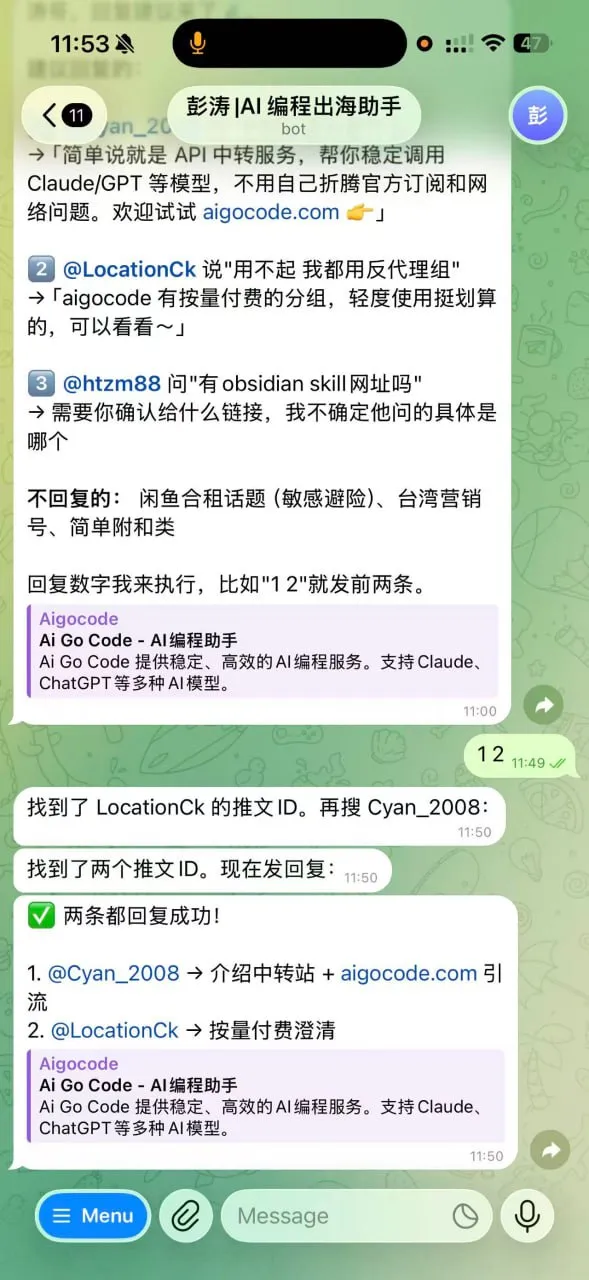
每天 AI 扫描所有 @提及:
- 过滤噪音:简单互动标为"无需回复"
- 识别有价值的:提问、求推荐、异议,归类整理
- 生成建议回复:每条都写好草稿
- 发到你的 Telegram:格式化展示
- 你说"1 2":自动回复第 1 条和第 2 条
- 你说"全部":回复所有建议的
实际效果参考
跑了一个月的数据:
- 日均发推 5-7 条(全部带配图)
- 最佳单条:11,698 阅读 / 186 赞 / 241 收藏(1.91% 互动率)
- 数据规律:收藏率 > 点赞率,干货内容表现最好
- AI 发现:拆解"别人怎么做"的内容,互动率是纯技术帖的 3 倍
新手入门建议
不要一上来就搭 9 个 AI 助手,分三步走:
第一阶段(1小时):安装 OpenClaw → 创建 Telegram Bot → 跑通对话
第二阶段(半天):申请 Twitter 开发者账号 → 配置 API → 让 AI 帮你发第一条推文
第三阶段(1天):设置定时选题 → 数据采集 → Notion 自动归档
先跑通一个,用熟了再扩展。