OpenClaw in Action: Daily Workflows That Actually Save Time
I've been tinkering with OpenClaw lately (previously called Moltbot, and before that Clawdbot) -- it changed its name twice in just a few days. Classic.
I bet I'm not the only one who, right after deploying it, immediately wanted to put it through its paces. This "fat lobster" that everyone's been talking about -- what can it actually do?
Honestly, most of these features are things other LLMs can do too. So what makes OpenClaw different?
I asked Claude directly, and I think the answer nailed it.
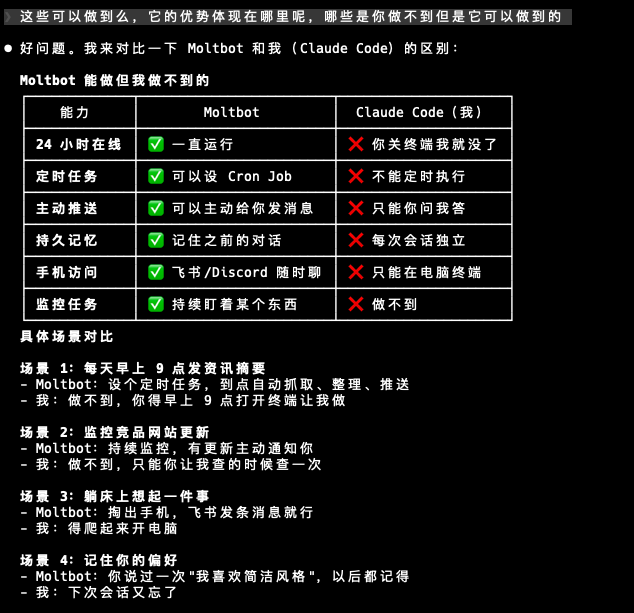
The core difference between OpenClaw and tools like Claude Code is this: Claude Code is interactive -- it needs a human sitting next to it. OpenClaw is autonomous -- it can proactively do work on its own. Just set up trigger conditions: a specific time, a file change, a status update.
It runs continuously in the background, working 24/7. You can command it from your phone through Lark, Discord, Telegram, or other chat apps -- pull out your phone anytime, anywhere, and start a conversation.
Here are a few workflows I've tested that genuinely save time.
Cross-Platform Content Publishing
I'd already set up cross-platform content publishing using Claude Skills, which saved a lot of effort. But I still had to manually trigger it each time -- it was still a human-driven process at its core.
After getting OpenClaw deployed, this was the first workflow I wanted to optimize. It might not be the perfect solution, but here's how it works: I just write the content and drop the file into a GitHub project folder. OpenClaw pulls the repo daily, detects new files, automatically syncs them to other platforms, moves the file to an archive folder, commits the code, and sends a Lark notification. The loop is closed.
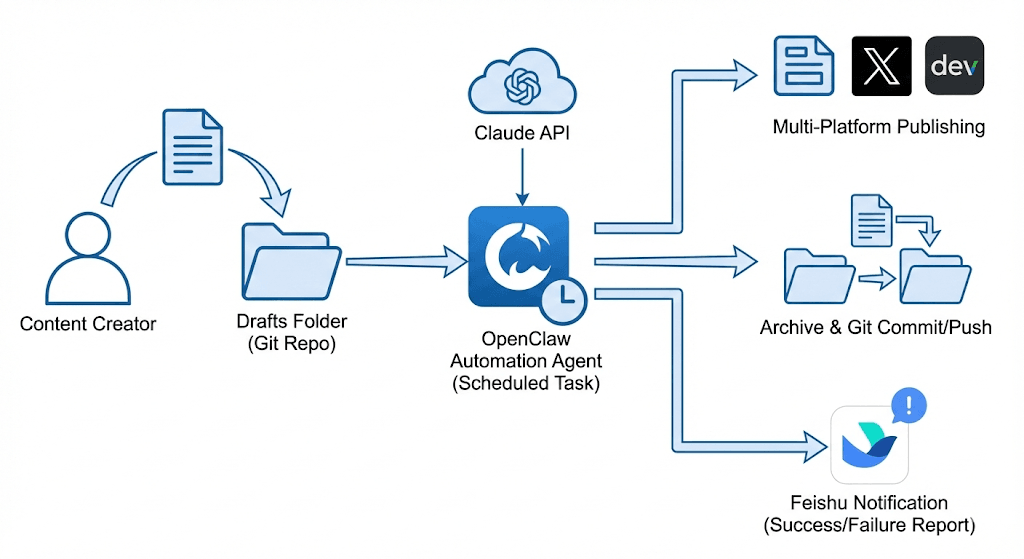
This is the ideal collaboration model: humans handle the creative work, and the system takes care of everything else. Archiving, logging, syncing, notifications -- all the repetitive labor is fully automated.
One pleasant surprise: it often anticipates my questions. When I quickly scan its reply and am about to follow up, I find the answer is already there in the previous message.
Aggregating Trending News
This was something I'd wanted to do for a while. I first tried building it as a Skill, then pivoted to a GitHub Action. It ran for a few days but the results were mediocre -- mainly because the content quality wasn't great.
This time I had OpenClaw help me re-optimize the whole thing. It analyzed the previous design docs and scripts, pointed out several key issues right away, and fixed them all in one go.
Now it sends a curated news digest every morning at 9:30 AM -- I can see the latest updates right when I start work. Given how fast things move in the AI space, I'm considering switching to twice daily, morning and evening. There's just too much happening.
Competitor Monitoring
OpenClaw is a natural fit for scheduled monitoring tasks. You can use it to regularly check competitor websites, App Store updates, and social media activity.
After chatting with it, all I had to do was provide the competitor website URLs and specify which pages to focus on, set the push schedule, and request real-time alerts for major changes.
I haven't seen results yet -- this one needs more time to validate.
Another idea: before building a feature, you can have it research existing solutions on the market, saving you the time of searching one by one. I haven't tried this yet, but it's worth exploring if you're interested.
SEO and Content System
Running a website means doing SEO, and SEO means having content. AI can really help fill out your site's content system.
Right now I have it generate one article every Monday, Wednesday, and Friday. Topics and keywords come from a pre-prepared keyword bank. Then it also scrapes information sources for any relevant breaking news and compiles them into news brief articles -- these aren't on a fixed schedule, they just go out when there's something worth sharing.
Next it calls the website's API to publish a draft, then sends a Lark notification reminding us to check the preview. If the preview looks good, one click and the article goes live on the site.
All the content categories, tags, titles, and meta descriptions are handled automatically. All I need to do is glance at the article when it lands in Lark, check for any obvious errors or issues, and hit publish if everything looks fine.
You can customize this for your own needs: What kind of content do you want? What are your site's target keywords? How often do you want updates? Just describe the boundaries clearly -- for example, tell it upfront that content must not be exaggerated or contain false information.
Browsing X
I discovered that OpenClaw can browse Twitter/X, which makes it much easier to scrape trending news and information.
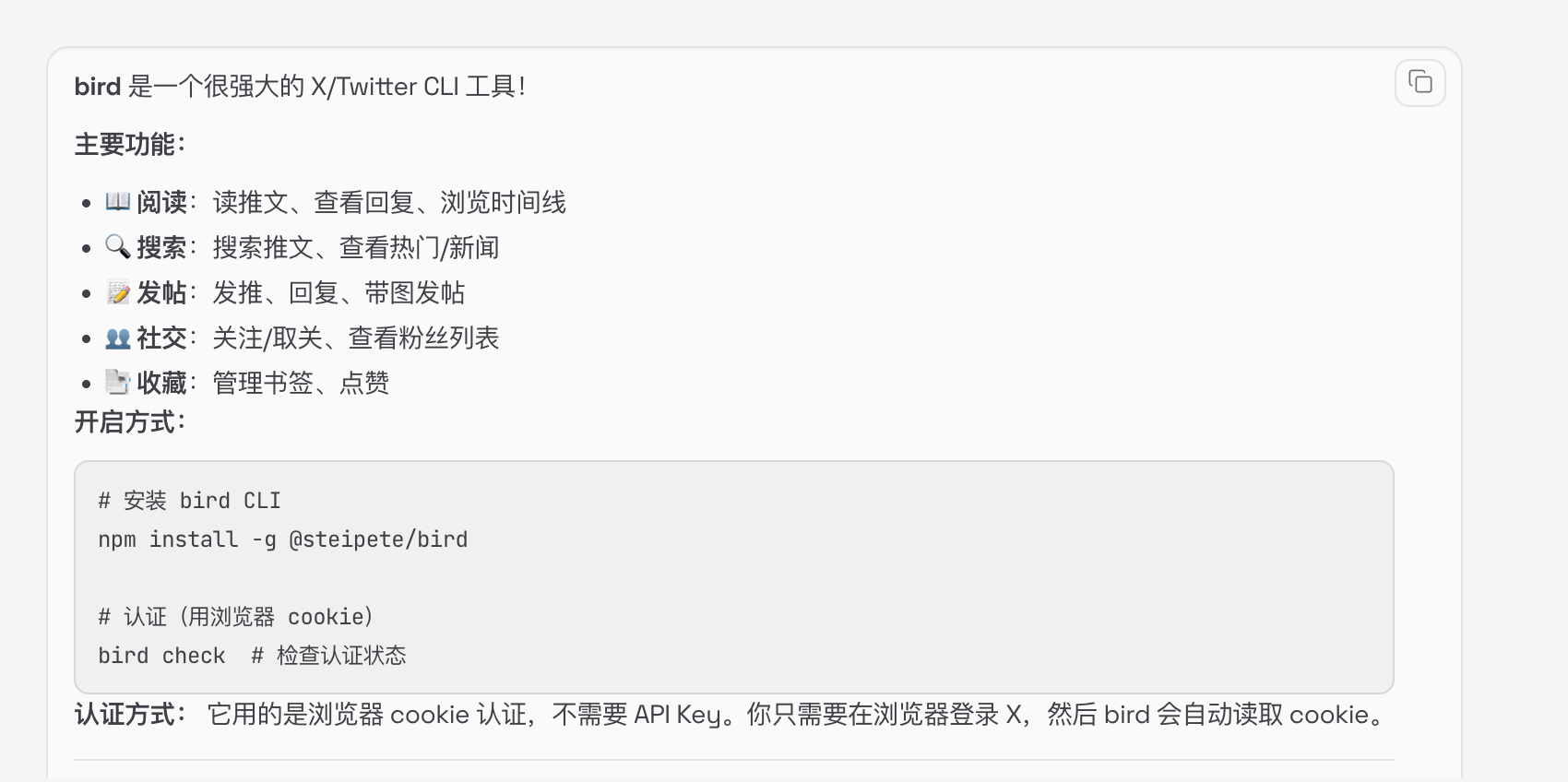
It uses a built-in tool called bird, a powerful X/Twitter CLI tool. Installation is straightforward -- just tell it "install this tool for me" and provide your browser cookies.
It can do quite a lot: read tweets, search, check trending topics, browse timelines. That said, I'd recommend using this tool only for reading, browsing, and searching. If you want to post, be cautious -- there's a risk of getting your account banned.
Viewing the Official Dashboard
OpenClaw actually has a Web UI where you can see its running status in the browser. If it's deployed on a server, you'll need SSH port forwarding to access it:
# SSH connection + port forwarding (run on your local machine)
gcloud compute ssh clawdbot-server -- -L 18789:localhost:18789

# Get the token-authenticated URL on the server
clawdbot dashboard

# Open the output URL in your local browser
# http://localhost:18789/?token=xxxxx
The logic is simple: port forwarding connects your local port 18789 to the server's port 18789, and the token handles authentication.
In this Web UI you can see a lot of things: configured channels (like Lark and Discord in my case), built-in Skills, and scheduled tasks (Cron Jobs).
Note that system-level cron jobs set on the server won't show up here -- you'll only see the scheduled tasks that OpenClaw manages itself.
Once you can talk to it, it will guide you through the rest. Whether it's installing plugins, configuring proxies, or setting up scheduled tasks -- just tell it what you want to do, and it'll walk you through it step by step.
One more thing: I still believe Skills are incredibly important. They define what the AI can do and how it does it, enriching the range of use cases. Without specific scenarios, OpenClaw is just another chatbot. With concrete business workflows, it becomes a real automation assistant.
Related Posts

Related Tutorial Chapters
Join the Claw101 Community
Stay updated with OpenClaw tips, AI coding techniques, and productivity tools.