5分钟接入AIGoCode,跑起你的第一个AI员工
OpenClaw 是一个开源 AI 助手框架,可以接入 Claude、Codex 等多个模型,通过 Telegram、Discord、飞书等渠道随时和你的 AI 助手对话。它能帮你写代码、搜索网页、管理 Notion、处理各种日常事务,支持多模型切换,一个入口用所有 AI。
这篇文章分享一下怎么用 AIGoCode 的中转服务快速接入 OpenClaw,从注册到跑起来,5 分钟左右能搞定。
获取 API Key
打开 aigocode.com 注册一个账号,进入后台创建 API Key。记下你的 Key 和 Base URL(https://api.aigocode.com)。AIGoCode 支持 Claude Opus、Codex 等主流模型,国内直连不需要翻墙,按量计费。
安装 OpenClaw
OpenClaw 需要 Node.js 22 以上版本,推荐在 Mac、Linux 或 WSL2 上运行。
npm install -g openclaw@latest
openclaw onboard --install-daemon
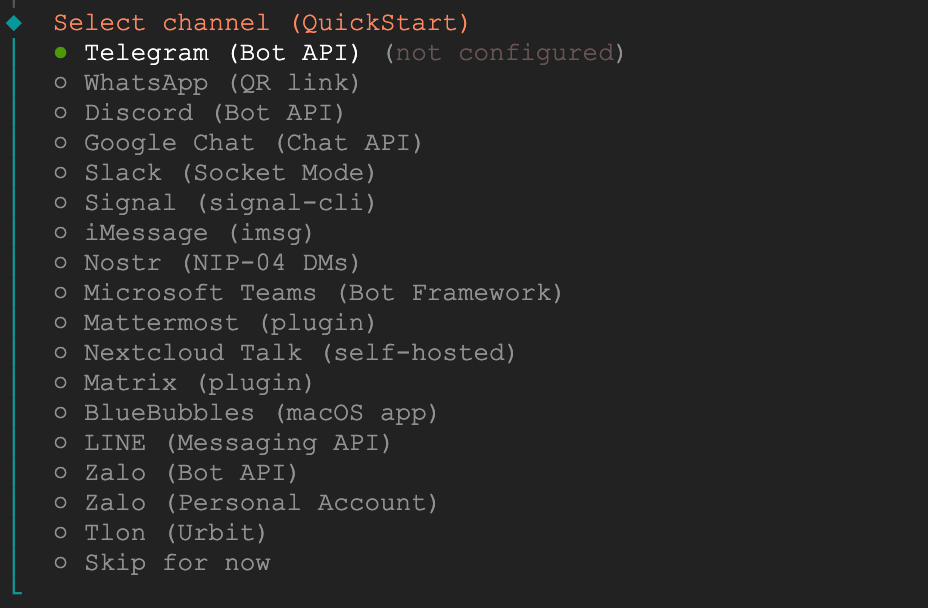
onboard 命令会启动一个配置向导,引导你选择模型和聊天渠道。如果是第一次用,推荐先连 Telegram,配置最简单。
接入 AIGoCode
在 OpenClaw 配置文件 ~/.openclaw/openclaw.json 中添加 AIGoCode 的 provider 配置。AIGoCode 同时支持 OpenAI 和 Claude 系列模型,一个 Key 就能用两种模型。
{
  "models": {
    "providers": {
      "openai-codex": {
        "baseUrl": "https://api.aigocode.com/v1",
        "apiKey": "你的 API Key",
        "api": "openai-responses",
        "models": [
          {
            "id": "gpt-5.3-codex",
            "name": "GPT-5.3 Codex",
            "reasoning": true,
            "input": ["text", "image"],
            "contextWindow": 200000,
            "maxTokens": 16384
          }
        ]
      },
      "aigocode-claude": {
        "baseUrl": "https://api.aigocode.com",
        "apiKey": "你的 API Key",
        "api": "anthropic-messages",
        "models": [
          {
            "id": "claude-opus-4-6",
            "name": "Claude Opus 4.6",
            "reasoning": true,
            "input": ["text", "image"],
            "contextWindow": 200000,
            "maxTokens": 16384
          }
        ]
      }
    }
  }
}
注意两个 provider 的 baseUrl 不一样:
openai-codex用的是 OpenAI Responses API 格式,baseUrl 带/v1aigocode-claude用的是 Anthropic Messages API 格式,baseUrl 不带/v1
两个 provider 用同一个 API Key,AIGoCode 后台会自动路由到对应的模型。
连接 Telegram
在 Telegram 找 @BotFather,创建一个机器人,拿到 Bot Token。把 Token 填入 openclaw.json 的 channels.telegram.botToken 字段,然后启动 OpenClaw:
openclaw gateway start
启动之后在 Telegram 给你的机器人发消息,输入 /pair 完成配对就行了。
切换模型
配好之后,在 Telegram 对话中直接发命令就能切换模型:
/model codex5.3        # 切换到 GPT-5.3 Codex,适合写代码
/model aigo4.6         # 切换到 Claude Opus 4.6,适合对话和写作
日常对话和写作推荐用 Claude Opus,写代码用 Codex,一个 AIGoCode 账号搞定两个顶级模型。随时 /model 一行命令就能切换,不需要重启。
跑起来之后能玩什么
OpenClaw 跑起来之后能玩的东西很多:
- 让 AI 帮你写代码直接推到 GitHub
- 设置定时任务做信息监控
- 接入 Notion 管理工作日志和知识库
- 发图片让 AI 识别分析
- 用 Brave Search 做选题调研
更多玩法可以看其他教程,或者直接问 OpenClaw 让它给你出方案。