Claw101
Back to Blog
2026-02-21
Share:TwitterTelegram

OpenClaw Multi-Agent Setup: Building a Growing AI Team

OpenClaw Multi-Agent Setup: Building a Growing AI Team

My Telegram has been filling up with new groups lately. One group is for chatting with Lobster about day-to-day stuff, another is dedicated to a writing assistant that polishes my articles, and a third is for a research assistant that gathers industry news. Behind all these groups is the same Bot -- just split into different Agents by task.

Before this, everything was crammed into a single session. Writing conversations mixed with casual chats, context kept getting tangled, and the memory kept bloating. After splitting them up, each one minds its own business. So much cleaner.

This is OpenClaw's native multi-Agent approach: multiple Agents within a single instance, with routing rules that assign different groups to different Agents. Way lighter than running multiple processes.

On top of that, I already had several instances running. Now each instance can be further divided into Agents, which means I essentially have an AI team that can keep growing.

Multiple Instances vs. Multiple Agents

Let me quickly break down the difference between these two approaches.

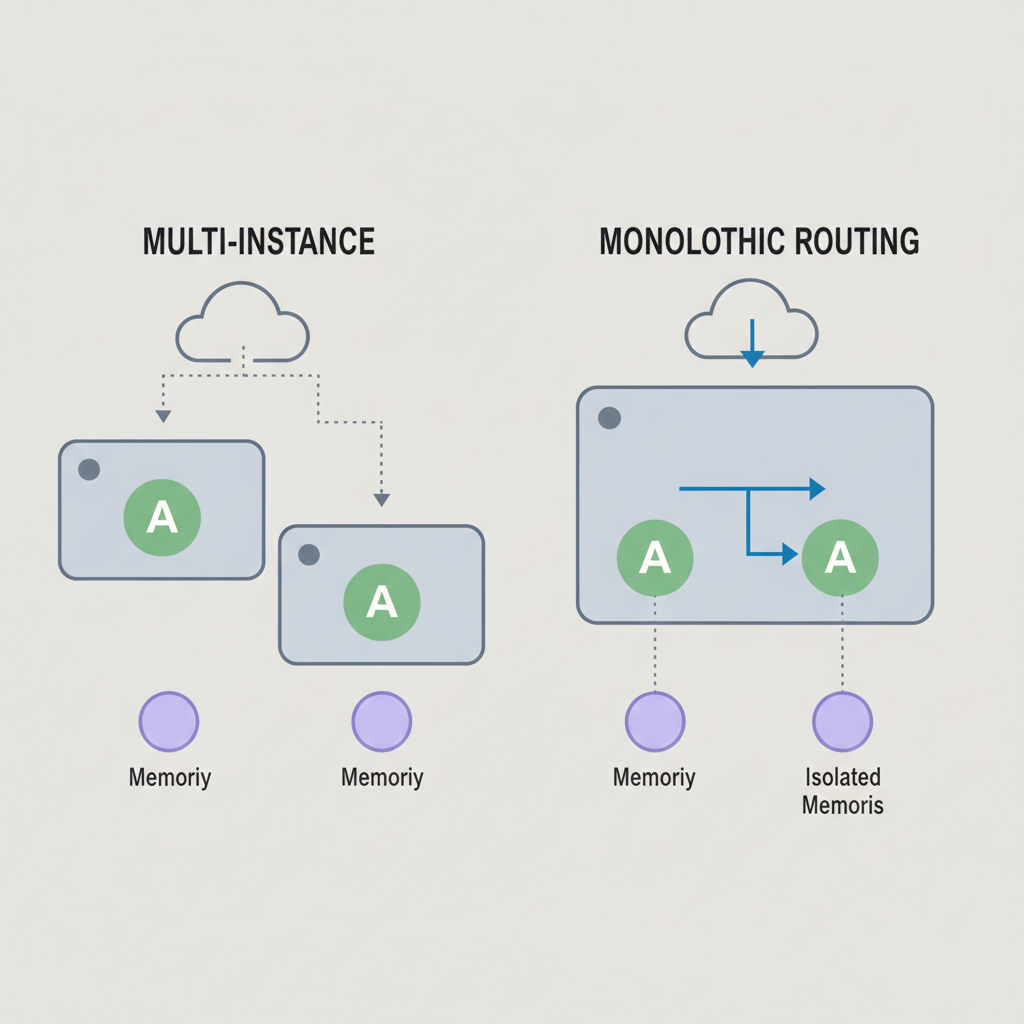
Multiple instances have the advantage of resilience -- if one instance goes down, another can step in and self-repair without human intervention. The downside is that each instance needs to be started, monitored, and updated separately, and they eat more server resources.

Single instance with multiple Agents is lightweight -- one process, one port, centralized configuration. But if the process crashes, all Agents go down together.

These two layers don't conflict. The recommended approach is to keep multiple instances as your resilience foundation, then use multiple Agents within each instance for task specialization.

Multi-instance vs. single-instance multi-Agent architecture comparison

Agent Isolation

In OpenClaw, an Agent is more than just a prompt. Each Agent has its own working directory (SOUL.md, USER.md, and skills all live here), its own state directory (session data and memory files, automatically isolated by agentId), and its own conversation history. Even when two Agents run under the same Telegram bot, their memories are completely separate.

This isolation happens at the physical level -- different Agents store their memories in different directories and database files. There's no cross-contamination.

Hands-On: Letting Lobster Handle All the Configuration

Take one of my instances as an example. A single Telegram bot handles content marketing: daily communication goes to the main Agent, WeChat article writing goes to the writing assistant, and news gathering goes to another assistant.

What I actually had to do was simple: create Telegram groups, add the bot to each one, and tell the main Agent the group IDs. Lobster handled all the rest of the configuration.

image

Lobster creates an independent working directory for each Agent, writes a SOUL.md to define each one's personality (the writing assistant focuses on polishing articles, the research assistant focuses on gathering information), registers the Agent list and routing rules (bindings) in openclaw.json, adds groups to the whitelist, and sets them to respond without requiring an @ mention.

OpenClaw also provides a CLI wizard -- openclaw agents add -- that can handle directory structure and basic configuration automatically. But the advantage of having Lobster do it is that it can write the SOUL.md and routing rules in one shot based on your description.

A couple of things worth noting from this process.

First: Telegram bot Group Privacy mode.

When it's enabled (the default), the bot can only see messages that @ it in a group -- it can't read regular messages. You need to go to @BotFather, send /setprivacy, and select Disable to turn it off. After changing this, you have to remove the bot from the group and add it back -- Telegram requires a re-join for the new setting to take effect.

There's also an alternative: just make the bot a group admin. Admins aren't restricted by Privacy mode, which saves you the remove-and-re-add step.

image

Second: Group IDs.

You can grab the number from the Telegram Web URL bar and use it directly, but note that regular groups and supergroups have different ID formats.

Shared vs. Independent Workspace

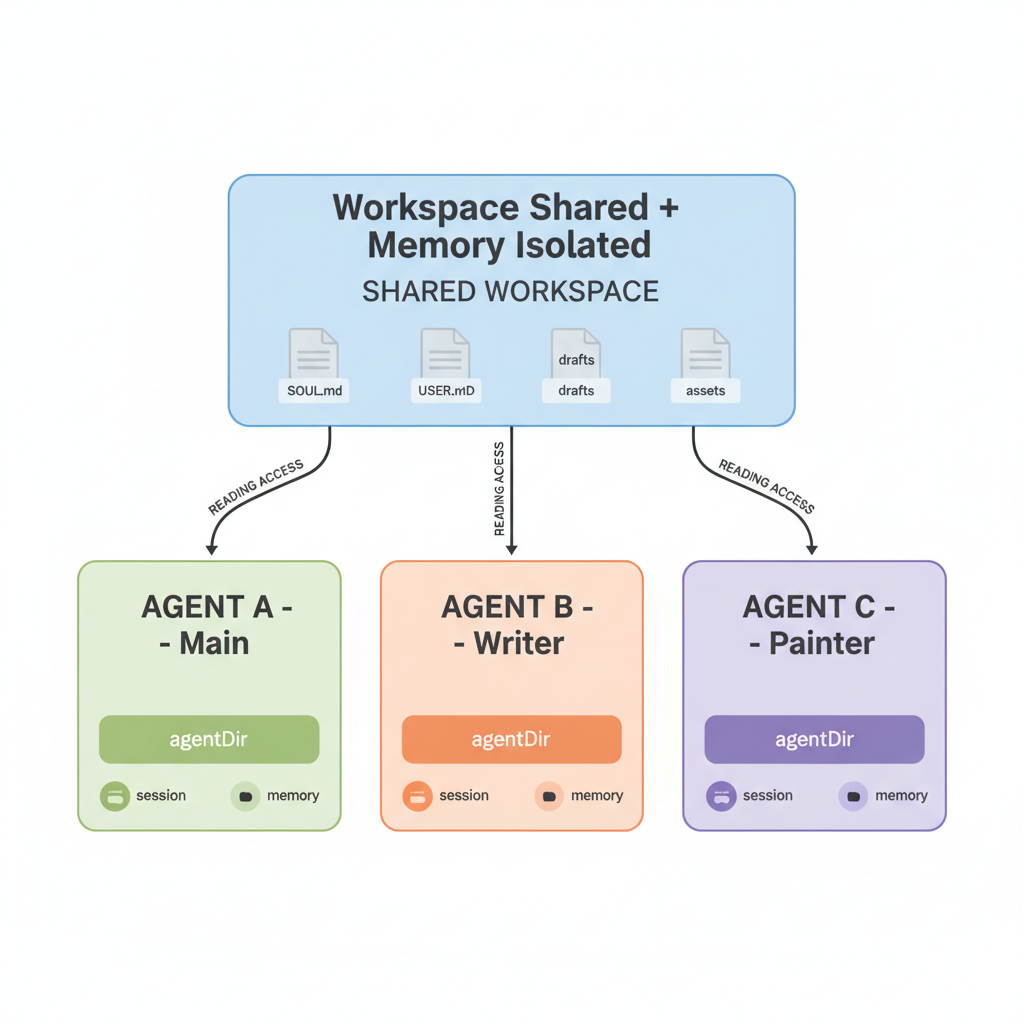
I discussed this one with Lobster specifically. The conclusion: share the workspace, isolate the memory.

A shared workspace means the writing assistant can read the main Agent's SOUL.md, USER.md, writing style preferences, and reference materials without maintaining duplicates. Meanwhile, the writing assistant's conversation history and session memory won't pollute the main Agent, because the state directory (agentDir) is always automatically isolated by agentId.

This way the writing assistant understands my style and context, but writing 10 articles won't bloat the main Agent's memory.

If a particular Agent creates a lot of files (like generating many drafts), give it an independent workspace to avoid file operations interfering with other Agents. Each Agent's workspace path can be specified separately in openclaw.json; if unspecified, they share by default.

img

Two Interaction Patterns

Once everything is set up, there are two ways to interact with sub-Agents.

The first is to chat directly in the corresponding group. This works well for extended collaboration sessions -- like spending an hour refining an article with the writing assistant. The group preserves the full conversation context, making it easy to iterate back and forth.

The second is delegation through the main Agent. OpenClaw supports sessions_spawn, where the main Agent can dispatch a task to the writing assistant and get the result back when it's done. This is great for quick one-off tasks, like "polish this dictated paragraph for me."

One thing to note: delegation is currently flat. Sub-Agents can't delegate further down -- all task splitting has to be done by the main Agent.

Both patterns can coexist. Use group chats for ongoing writing collaboration, and main Agent delegation for ad-hoc tasks. Pick whichever fits the situation.

Model Assignment and Scaling Pace

Multi-Agent setups have another advantage: you can assign different models to different tasks. Tasks requiring deep thinking (writing, complex analysis) get Claude Opus, while simpler errands (information lookup, format conversion) can use other models. This saves a meaningful amount on costs.

You don't need to design 10 Agents upfront. Start with an instance, use it, and whenever a particular scenario feels like it should be split off, split it. Add one at a time. Typically 3 to 5 Agents cover most daily needs. But the ceiling is high -- I now have several instances running, each with multiple Agents. As long as you keep splitting scenarios finely enough, this team can keep growing. Everyone has their own role, does their own work, and doesn't interfere with each other. When collaboration is needed, the main Agent ties everything together.

It's the same logic as building a real team. In the early days of a startup, you do everything yourself. As the business gets more complex, you hire people and divide the work. AI Agents follow the same trajectory -- from "one-person company" to "team of specialists." It's a natural progression. If you haven't tried multi-Agent yet, start by splitting off a writing assistant. That's the easiest place to see immediate results.

Share:TwitterTelegram

Related Tutorial Chapters

WeChat QR

Follow WeChat: 彭少

Stay updated with OpenClaw tips, AI coding techniques, and productivity tools. Follow for the latest content.